Introduction
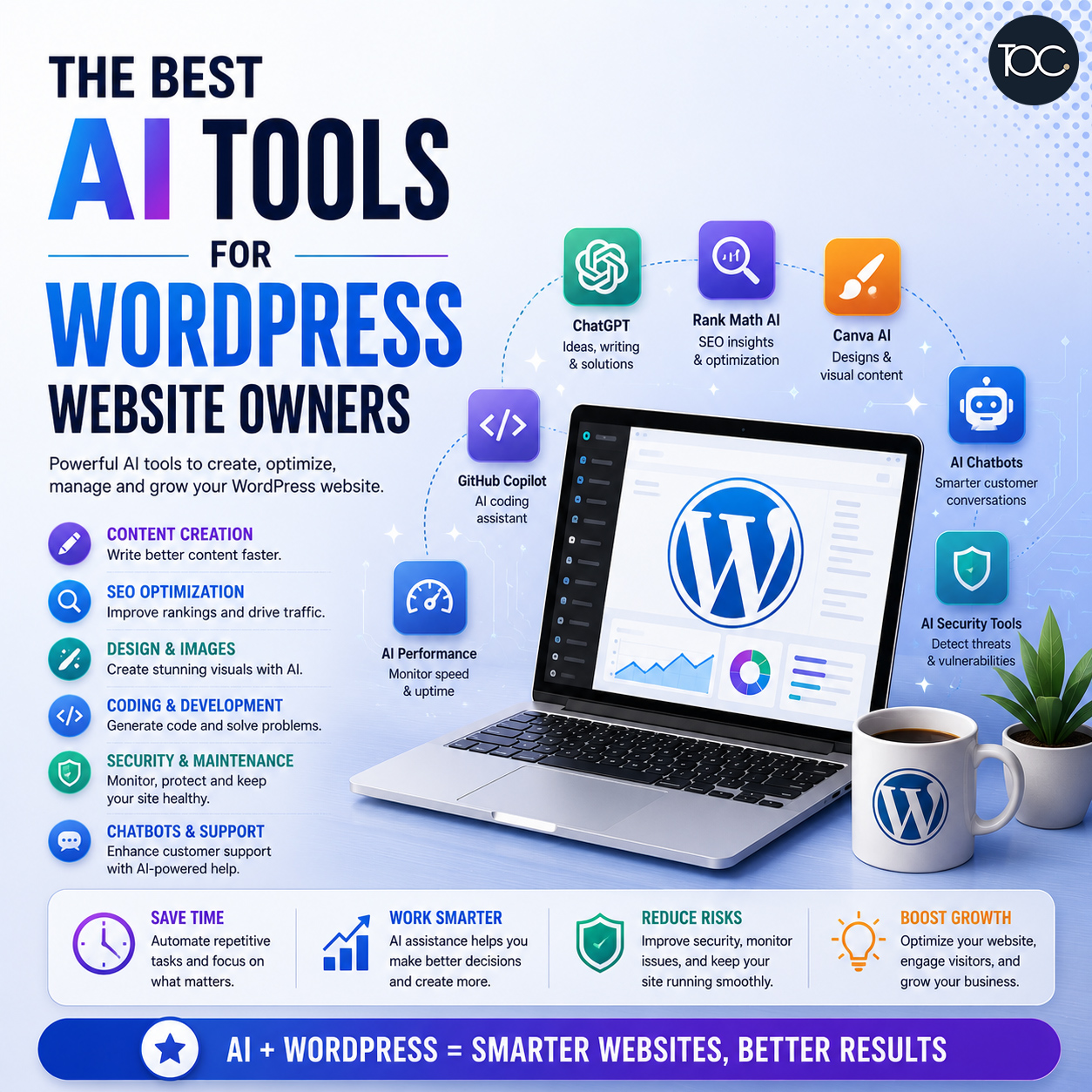
AI tools for WordPress are changing the way website owners create content, optimise SEO, manage websites, troubleshoot problems, and improve productivity.
Tasks that previously required hours of research or manual work can now be completed much faster with the help of artificial intelligence.
But with so many AI tools available, which ones are actually useful for WordPress website owners?
The answer depends on what you’re trying to achieve.
Some AI tools are excellent for writing and content planning. Others can help with SEO, image creation, coding, customer support, website management, or technical troubleshooting.
In this guide, we’ll look at some of the most useful types of AI tools for WordPress website owners, how they can help, and where human judgement is still important.
Table of Content
1. Why Use AI Tools With WordPress?
WordPress is already an extremely flexible website platform.
Through themes, plugins, and custom development, it can be used to build everything from a simple business website to an eCommerce store, membership portal, publication, or online learning platform.
AI adds another layer of capability.
Instead of replacing WordPress, AI can make many everyday WordPress tasks faster and easier.
Website owners can use AI to help:
- Plan website content
- Write and improve copy
- Generate blog ideas
- Research topics
- Improve SEO
- Create images
- Write code
- Troubleshoot errors
- Analyse website information
- Answer customer questions
- Automate repetitive tasks
The biggest advantage isn’t necessarily doing everything automatically.
It’s saving time while helping you make better decisions.
2. ChatGPT – Content, Ideas and Problem Solving
ChatGPT is probably one of the most versatile AI tools a WordPress website owner can use.
Rather than being designed specifically for WordPress, it can assist with a huge range of website-related tasks.
What Can ChatGPT Help With?
You can use ChatGPT for:
- Website content planning
- Blog topic generation
- Content outlines
- Headline ideas
- FAQs
- Product descriptions
- Calls-to-action
- Meta descriptions
- Content rewriting
- Coding assistance
- WordPress troubleshooting
For example, instead of staring at a blank screen when planning your next blog post, you could ask:
Suggest 20 blog topics for a Singapore interior design company targeting homeowners.
You can then refine those ideas before deciding which topics are worth developing.
ChatGPT for WordPress Troubleshooting
ChatGPT can also be surprisingly useful when something goes wrong.
You can provide an error message or explain the problem and ask for possible causes.
For example:
My WordPress contact form submits successfully, but the email isn’t being received. What should I check?
AI can suggest a troubleshooting process involving email configuration, SMTP, spam filtering, plugin conflicts, and server settings.
However, technical suggestions should always be reviewed carefully before making changes to a live website.
3. WordPress AI Features and Plugins
The WordPress ecosystem is increasingly integrating AI directly into the editing experience.
Depending on the plugin or platform you’re using, AI functionality may help with:
- Generating text
- Rewriting paragraphs
- Creating excerpts
- Generating titles
- Translating content
- Creating images
- Suggesting SEO improvements
The advantage of using AI directly inside WordPress is convenience.
Instead of constantly switching between WordPress and another application, certain tasks can be completed from within the website dashboard.
Should You Install an AI Plugin?
Not necessarily.
Before installing another plugin, ask yourself whether you genuinely need it.
If ChatGPT or another external AI tool already performs the task effectively, adding another WordPress plugin may simply introduce:
- Additional updates
- Database usage
- Compatibility dependencies
- Security considerations
- Extra maintenance
Install plugins because they provide genuine value—not simply because they include AI.
4. Rank Math – AI-Assisted WordPress SEO
SEO is one area where artificial intelligence can help significantly.
WordPress SEO plugins such as Rank Math provide tools for managing important on-page SEO elements, including:
- SEO titles
- Meta descriptions
- XML sitemaps
- Schema
- Indexing settings
- Page optimisation
AI-assisted features can additionally help generate content suggestions and SEO ideas.
But there’s an important distinction between SEO assistance and SEO strategy.
An AI tool might recommend using a keyword more frequently, but that doesn’t automatically mean the keyword is commercially valuable or realistic to rank for.
Website owners should still consider:
- Search intent
- Keyword relevance
- Competition
- Search volume
- Existing rankings
- Business value
AI should support your SEO decisions rather than make all of them for you.
5. Google Gemini – Research and Content Assistance
Google Gemini is another general-purpose AI assistant that can be useful for WordPress website owners.
It can help with tasks such as:
- Research
- Content planning
- Summarising information
- Brainstorming
- Writing
- Data analysis
- Coding
Having access to more than one AI assistant can sometimes be useful because different tools may approach the same problem differently.
For important content, you can even compare suggestions before deciding which direction works best.
However, regardless of which AI platform you use, factual information should always be verified before publication.
6. Claude – Long-Form Content and Document Analysis
Claude is particularly useful when working with longer pieces of information.
WordPress website owners may find it useful for:
- Reviewing long articles
- Analysing documents
- Restructuring content
- Summarising information
- Writing long-form drafts
- Coding assistance
For example, if you have an old 3,000-word article that needs updating, AI can help identify sections that are repetitive, unclear, or potentially outdated.
You can then decide what should actually be changed.
This is much more effective than automatically rewriting the entire article.
7. Canva AI – Website Graphics and Social Media Content
WordPress websites need visual content.
That might include:
- Blog featured images
- Website banners
- Social media graphics
- Infographics
- Presentation graphics
- Marketing materials
Canva’s AI-powered features can help users generate designs, resize graphics, remove backgrounds, generate images, and create variations more quickly.
This can be particularly useful for small businesses without an in-house graphic designer.
However, maintaining visual consistency remains important.
If every blog post uses a completely different AI-generated style, your website can quickly lose its brand identity.
Create consistent rules around:
- Colours
- Fonts
- Image style
- Logo placement
- Layout
AI should make your design process faster without making your brand inconsistent.
8. AI Image Generators – Creating Original Website Visuals
AI image generation has improved significantly.
Instead of relying entirely on generic stock photography, businesses can now generate visuals specifically for their website content.
AI-generated images can be useful for:
- Blog featured images
- Concept illustrations
- Technology graphics
- Background images
- Social media content
- Marketing campaigns
For example, an article about WordPress security could use a custom illustration combining:
WordPress + Security + Website Monitoring
rather than using the same stock image found on hundreds of other websites.
Don’t Forget Image Optimisation
AI-generated images can be large.
Before uploading them to WordPress:
- Resize them appropriately
- Compress the files
- Use modern image formats where appropriate
- Add descriptive ALT text
- Avoid uploading unnecessarily huge images
Beautiful AI images aren’t useful if they make your website slow.
9. GitHub Copilot – Coding Assistance
For developers working on WordPress websites, AI coding assistants such as GitHub Copilot can significantly improve productivity.
They can assist with:
- PHP
- CSS
- JavaScript
- HTML
- WordPress functions
- WooCommerce customisation
- Debugging
- Code documentation
For example, AI might help a developer generate a starting point for a custom WordPress function rather than writing everything from scratch.
But AI-generated code should never be blindly copied into a live website.
Code should still be:
- Reviewed
- Tested
- Secured
- Validated
- Backed up before implementation
A small mistake in PHP can bring down an entire WordPress website.
10. AI for WordPress Security
Artificial intelligence and machine learning are increasingly being used in cybersecurity.
Security tools can analyse website activity and identify unusual patterns such as:
- Suspicious login attempts
- Malware
- Unexpected file changes
- Abnormal traffic
- Known vulnerabilities
- Bot activity
This allows website owners and developers to identify potential problems earlier.
However, security tools frequently generate alerts that need interpretation.
Not every failed login means your website is being specifically targeted.
Many WordPress attacks are performed by automated bots scanning thousands of websites.
AI can help identify suspicious activity, but human expertise is still important when deciding what action should be taken.
11. AI for Website Performance Monitoring
Website speed is important for both user experience and SEO.
AI-assisted monitoring tools can analyse:
- Page loading times
- Core Web Vitals
- Server response times
- Image sizes
- Scripts
- Performance changes
AI can then suggest potential improvements.
For example, it might identify:
- Oversized images
- Unnecessary JavaScript
- Poor caching
- Slow third-party scripts
- Database issues
These recommendations can save time during performance troubleshooting.
But optimisation changes should always be tested.
Removing or delaying the wrong script could cause website functionality to stop working.
12. AI for WordPress Website Maintenance
AI can also play an increasingly important role in ongoing WordPress maintenance.
It can assist with:
- Update monitoring
- Vulnerability detection
- Performance monitoring
- Broken link detection
- Error diagnosis
- Backup monitoring
- Content auditing
This allows many routine tasks to be automated.
However, there’s a difference between:
identifying a problem
and
knowing how to resolve it safely.
For example, AI might detect that a WordPress plugin needs updating.
But after the update, your contact form might stop working because of a compatibility issue.
The website therefore still needs human oversight.
13. AI Chatbots for Customer Support
AI chatbots can help businesses answer common customer questions directly on their websites.
Depending on the business, a chatbot might answer questions about:
- Services
- Opening hours
- Product information
- Delivery
- Appointments
- Pricing
- Frequently asked questions
More advanced AI chatbots can use information from your website or knowledge base to provide more relevant responses.
However, businesses should think carefully about what information the chatbot is allowed to provide.
AI shouldn’t confidently invent:
- Prices
- Policies
- Guarantees
- Product specifications
- Legal information
There should also be a clear way for customers to contact a human when necessary.
14. AI for WooCommerce
WooCommerce website owners can use AI in several ways.
For example:
Product Descriptions
AI can help turn basic product information into clearer descriptions.
Product Image Ideas
AI can assist with backgrounds, promotional visuals, and campaign concepts.
Customer Support
Chatbots can answer common questions about products, shipping, and orders.
Marketing
AI can help create:
- Email campaigns
- Social posts
- Advertisement ideas
- Product promotions
Data Analysis
AI can help interpret sales data and identify trends.
But AI shouldn’t invent product information.
Always provide accurate specifications, pricing, delivery details, and policies.
15. AI for Multilingual WordPress Websites
AI-powered translation has become significantly better.
For businesses operating in multiple markets, AI can help translate:
- Website pages
- Product descriptions
- Blog posts
- FAQs
- Meta descriptions
This can reduce the time required to create multilingual content.
However, translation quality still varies.
Important customer-facing content should ideally be reviewed by someone fluent in the language, particularly when dealing with:
- Technical terminology
- Legal information
- Cultural differences
- Industry-specific language
Translation isn’t simply about replacing words.
The meaning and tone also need to remain appropriate.
16. Which AI Tools Do WordPress Website Owners Actually Need?
You don’t need every AI tool available.
In fact, subscribing to too many AI platforms can create another problem: tool overload.
For many WordPress website owners, a practical AI toolkit might include:
| Requirement | AI Tool Type |
|---|---|
| Content planning | General AI assistant |
| Blog writing | General AI assistant |
| SEO | WordPress SEO tools + AI |
| Images | AI image generator |
| Graphics | AI-assisted design platform |
| Coding | AI coding assistant |
| Security | Security monitoring tools |
| Maintenance | Monitoring + automation |
| Customer service | AI chatbot |
Choose tools based on actual problems you need to solve.
Don’t adopt AI simply because it’s fashionable.
17. What AI Shouldn’t Replace
AI can make WordPress management much more efficient.
But there are several things it shouldn’t completely replace.
Business Knowledge
You understand your customers, services, products, and industry better than a generic AI model.
Human Review
AI can produce convincing information that is inaccurate.
Important website content should always be reviewed.
AI can generate layouts and design ideas, but successful websites still require consideration of:
- User experience
- Branding
- Accessibility
- Conversion
- Mobile responsiveness
- Business objectives
Technical Expertise
AI can suggest how to fix a WordPress problem.
Knowing whether the suggested fix is safe is another matter.
SEO Strategy
AI can generate keywords and content ideas, but real SEO strategy should be based on search behaviour, competition, website performance, and business objectives.
18. The Biggest Mistake: Using AI Without Checking Its Work
AI is fast.
That’s also why mistakes can spread quickly.
Imagine asking AI to generate 100 product descriptions and publishing all of them automatically.
If the original information is incomplete, AI might generate inaccurate claims across 100 products.
The same applies to:
- Website content
- Code
- SEO
- Translations
- Customer support
- Technical changes
A useful rule is:
Use AI to accelerate the work—not to eliminate quality control.
19. AI + WordPress Is a Powerful Combination
WordPress gives businesses flexibility and control.
AI adds speed and efficiency.
Together, they can significantly improve the way websites are built and managed.
AI can help website owners:
- Work faster
- Generate ideas
- Create content
- Improve SEO
- Diagnose problems
- Automate repetitive tasks
- Analyse website data
Meanwhile, WordPress continues to provide the platform, content management system, plugin ecosystem, and flexibility needed to build sophisticated business websites.
Rather than asking whether AI will replace WordPress, the more useful question may be:
How can AI make WordPress better?
20. Final Thoughts
The best AI tools for WordPress aren’t necessarily the tools with the most impressive AI features.
They’re the ones that solve genuine problems.
A good AI tool should help you:
- Save time
- Improve productivity
- Identify problems earlier
- Create better content
- Make more informed decisions
But AI should still be treated as an assistant.
Whether you’re generating website content, writing code, optimising SEO, maintaining WordPress, or creating graphics, human review remains essential.
The businesses that benefit most from AI won’t necessarily be those that automate everything.
They’ll be the ones that understand what should be automated and what still requires human expertise.
21. Frequently Asked Questions
21. Frequently Asked Questions
22. Need Help With Your WordPress Website?
AI is making WordPress more powerful, but choosing the right tools and implementing them correctly still matters.
At THEOLDCOMPANY, we combine professional WordPress development, web design, SEO best practices, website maintenance, and modern AI tools to help businesses build and manage effective websites.
Whether you’re planning a new WordPress website, improving an existing one, or looking for ongoing website maintenance, we can help you choose the right approach for your business.
📩 Contact us to discuss your WordPress website requirements.