Introduction
WordPress is one of the most popular website platforms in the world, powering millions of websites across various industries.
Its flexibility, scalability, and SEO-friendly features make WordPress an excellent choice for businesses. However, many website owners make avoidable mistakes that can negatively affect performance, security, SEO, and user experience.
In this guide, we’ll explore the most common WordPress mistakes businesses should avoid and how to keep your website running smoothly.
Table of Content
1. Why Avoiding WordPress Mistakes Matters
Even a professionally designed website can suffer if it is not properly maintained.
Common WordPress mistakes can lead to:
- Slow website speed
- Security vulnerabilities
- Poor Google rankings
- Broken functionality
- Lost leads and enquiries
Fortunately, most of these issues are preventable.
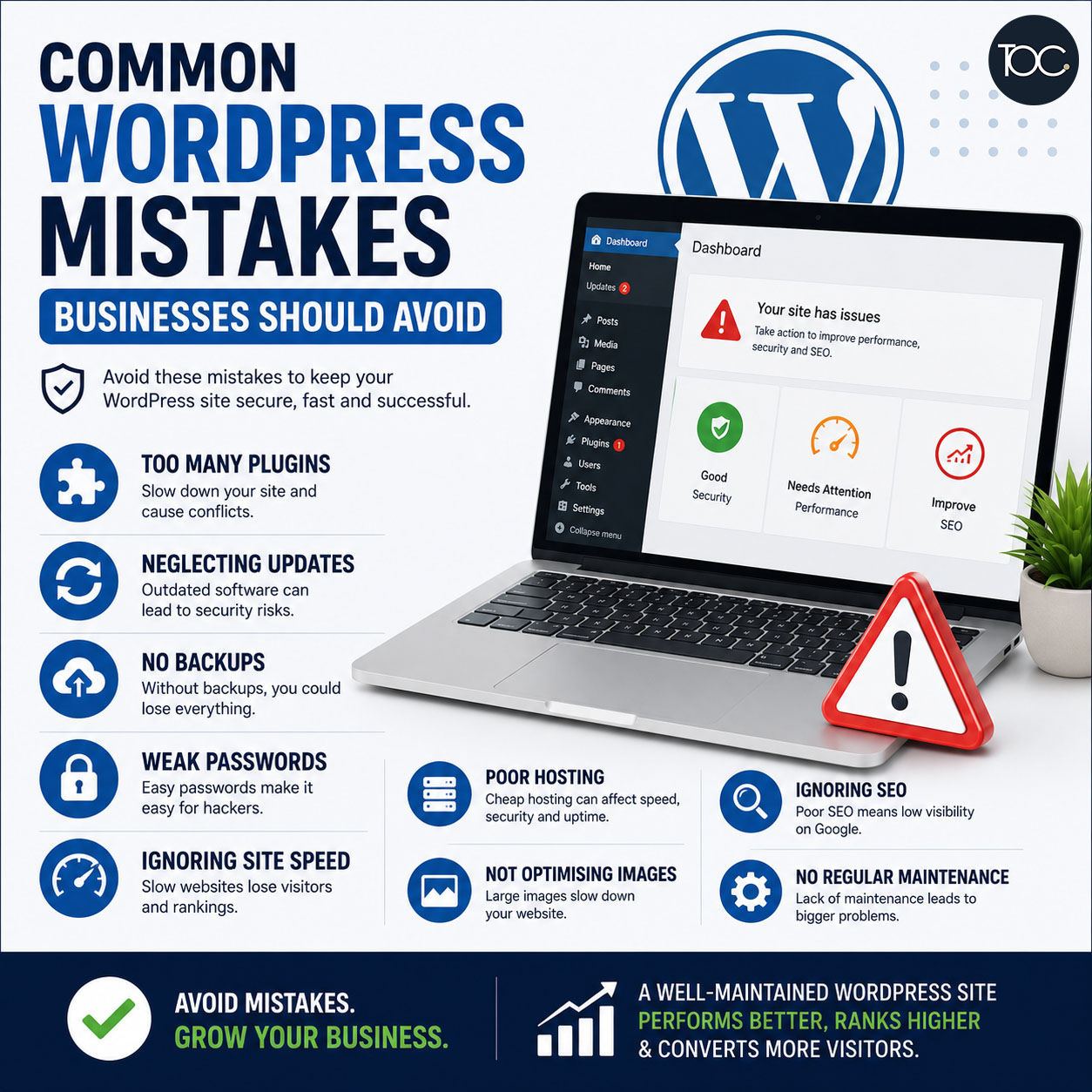
2. Installing Too Many Plugins
One of the biggest mistakes WordPress users make is installing too many plugins.
While plugins add useful functionality, excessive plugins can:
- Slow down your website
- Create compatibility issues
- Increase security risks
- Cause maintenance headaches
Instead, only install plugins that are necessary and regularly maintained.
👉 Related Reading: Best WordPress Plugins for Singapore Business Websites
3. Neglecting WordPress Updates
Many businesses ignore WordPress updates because they fear something might break.
However, outdated software can expose your website to:
- Security vulnerabilities
- Plugin conflicts
- Performance issues
You should regularly update:
- WordPress core
- Themes
- Plugins
Always perform a backup before updating.
4. Not Backing Up Your Website
Imagine losing your entire website due to:
- Hacking
- Server failure
- Human error
- Plugin conflicts
Without a backup, recovery can be difficult and costly.
Every WordPress website should have an automated backup solution in place.
Backups provide peace of mind and allow quick restoration if problems occur.
5. Using Weak Passwords
Website security often starts with something simple: passwords.
Common mistakes include:
- Using easy-to-guess passwords
- Sharing login credentials
- Reusing passwords across multiple platforms
Strong passwords and two-factor authentication help protect your website from unauthorised access.
6. Ignoring Website Speed
Website speed affects:
- User experience
- SEO rankings
- Conversion rates
A slow website can cause visitors to leave before they even view your content.
Common causes include:
- Large image files
- Poor hosting
- Too many plugins
- Unoptimised code
Improving website speed should be a priority for every business website.
7. Choosing Cheap or Poor-Quality Hosting
Many businesses select hosting based solely on price.
Unfortunately, low-quality hosting can lead to:
- Slow performance
- Downtime
- Security issues
- Poor user experience
Reliable hosting is an investment in your website’s performance and stability.
8. Not Optimising Images
Large image files are one of the most common reasons websites load slowly.
Before uploading images:
- Compress image sizes
- Use modern file formats
- Resize images appropriately
Optimised images help improve both SEO and user experience.
9. Ignoring SEO Best Practices
Many businesses launch a WordPress website without considering SEO.
Common SEO mistakes include:
- Missing meta titles
- Missing meta descriptions
- Poor keyword targeting
- Duplicate content
- Weak internal linking
SEO should be part of your website strategy from the beginning.
👉 Related Reading: Is WordPress Good for SEO?
10. Not Securing the Website
Security should never be an afterthought.
Common security oversights include:
- No SSL certificate
- Outdated plugins
- Weak passwords
- No security monitoring
A hacked website can damage your reputation and affect search rankings.
Using security plugins and keeping software updated helps reduce risk.
11. Not Performing Regular Maintenance
Many businesses assume a website can be left untouched after launch.
In reality, WordPress websites require ongoing maintenance to ensure:
- Security
- Performance
- Compatibility
- Reliability
Regular maintenance helps identify issues before they become serious problems.
👉 Related Reading: Importance of Website Maintenance
12. How to Keep Your WordPress Website Healthy
To maintain a secure and high-performing WordPress website:
✅ Update WordPress regularly
✅ Use trusted plugins
✅ Perform automated backups
✅ Optimise website speed
✅ Monitor website security
✅ Review SEO performance
✅ Conduct regular maintenance checks
These practices can significantly improve website reliability and performance.
13. Final Thoughts
Avoiding these common wordpress mistakes can help protect your website, improve SEO performance, and provide a better experience for visitors.
WordPress is a powerful platform, but its success depends on proper management and maintenance.
By staying proactive and following best practices, your website can remain secure, fast, and effective for years to come.
14. Frequently Asked Questions
14. Frequently Asked Questions
15. Need Help Maintaining Your WordPress Website?
Keeping a WordPress website secure, updated, and performing at its best requires ongoing attention.
Our WordPress maintenance services help businesses stay protected, improve website performance, and avoid costly issues.
📩 Contact us today for a free, no-obligation consultation and discover how we can keep your website running smoothly.